
Precision label workspace
Design and print labels that line up every time.
Turn PDF templates into precise, reusable label sheets. Bring your layout, data, and print setup into one connected workspace.
Built for the next production run
Exact measurements. Reusable projects. A clear path from the first template to the finished sheet.
The working surface
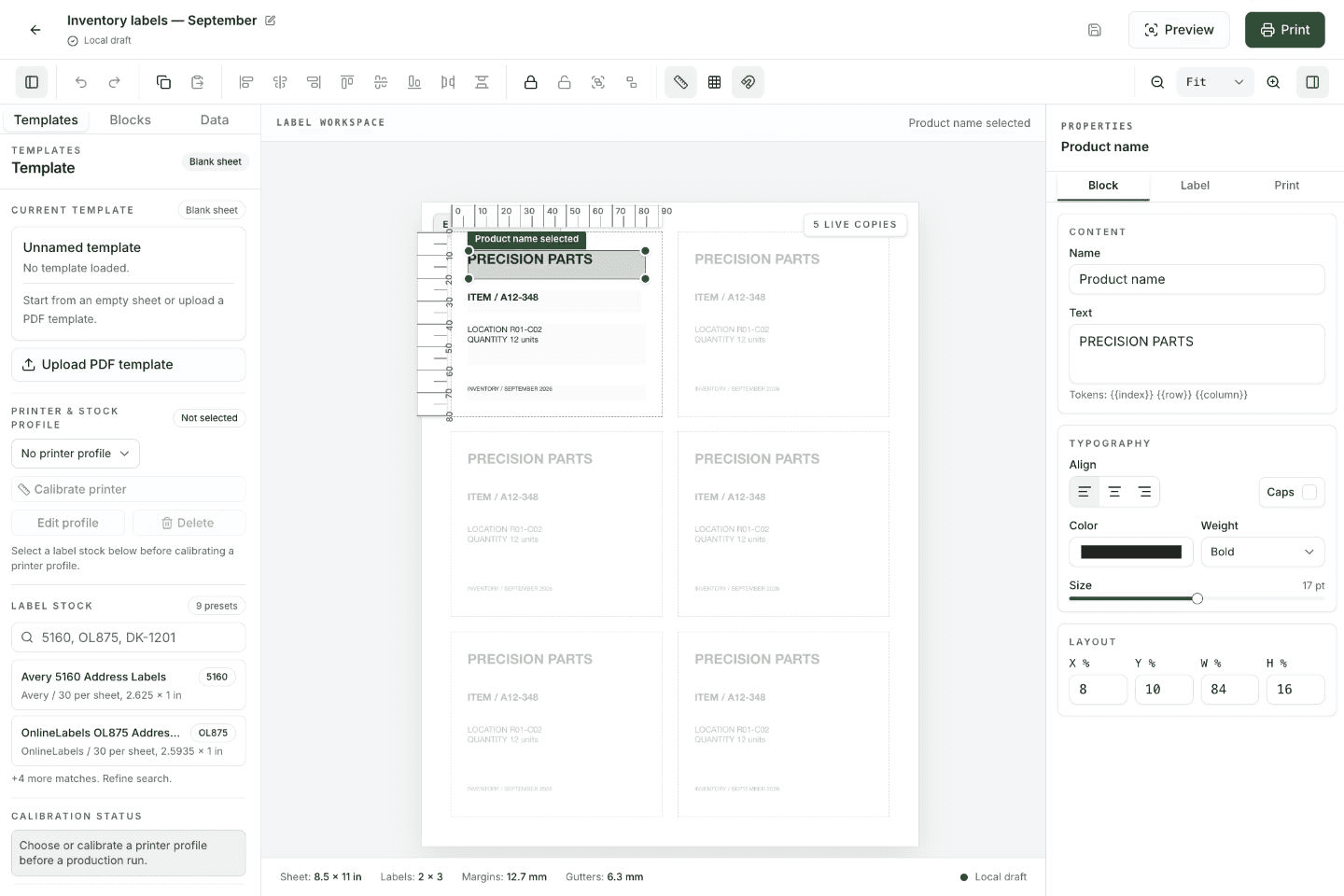
Your sheet at the center.
Your tools within reach.
Templates, blocks, and data on one side. Precise properties on the other. See how the whole sheet comes together before you print.
A repeatable process
Set up once. Keep the next run simple.
- 01
Start with your sheet
Import a PDF template or choose label stock. Keep the measurements that make your layout work.
- 02
Make every detail count
Arrange text, connect spreadsheet fields, and align reusable blocks with precise guides.
- 03
Check. Calibrate. Print.
Review the full sheet, fine-tune your printer, and export an exact-size PDF for your next run.
Organized for you.
Ready for your team.
Keep personal projects separate from shared work. Bring templates, saved revisions, and workspace access together.
- Personal and shared workspaces
- Reusable templates and saved projects
- Spreadsheet fields for repeatable labels
- Printer calibration and exact-size PDF output
Your next label run